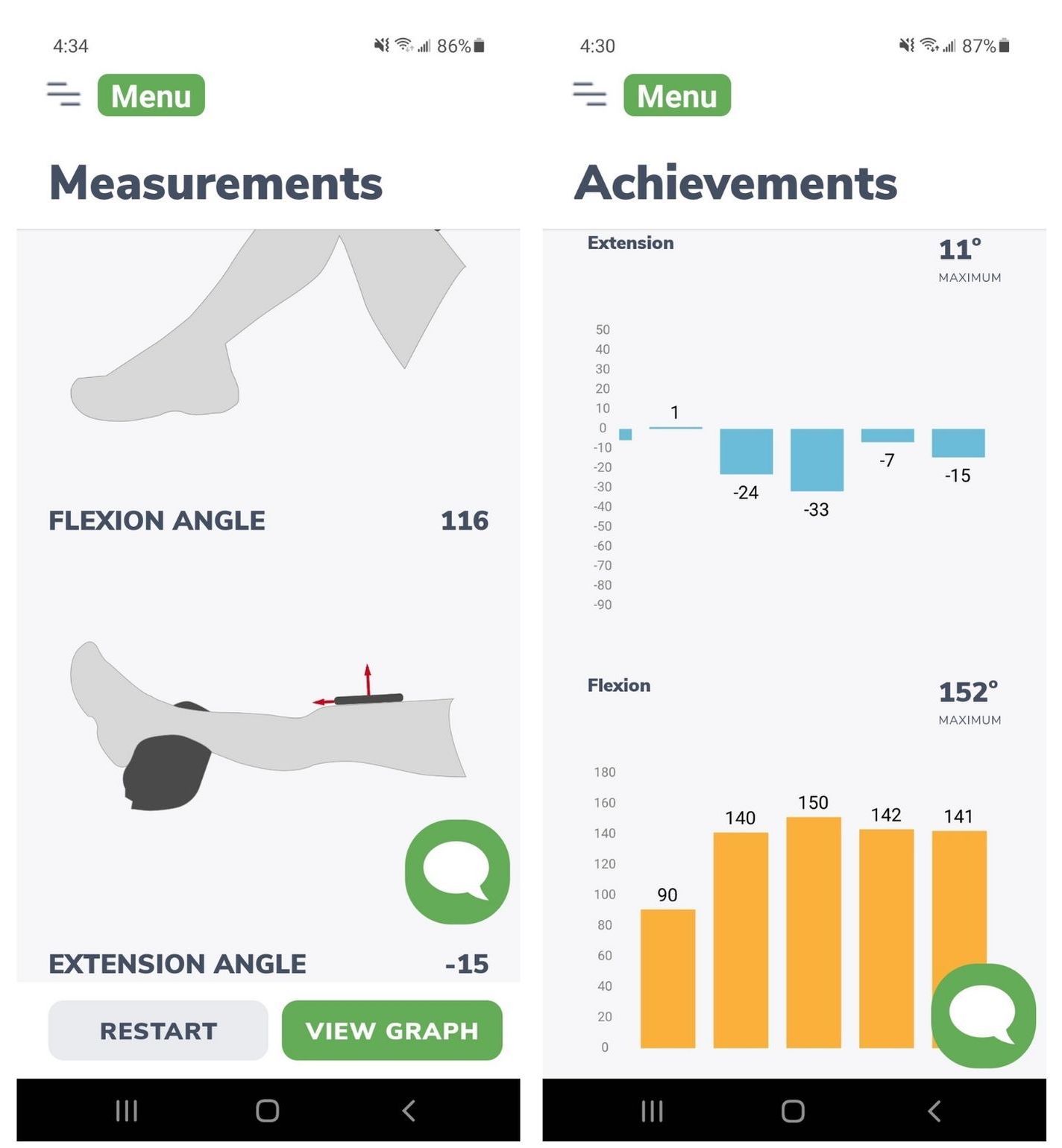
A crucial aspect of recovery after a knee injury or surgery is how far your knee bends and extends. Two common knee problems that require regular knee measurements are an ACL injury or surgery and a knee replacement. Bending and extending your knee is also called knee range of motion. One of the great things about knee range of motion is that it is such a simple measurement and can tell you so much about your progress. However, most people must visit a physical therapist in person to receive this essential measurement. There are several limitations here:
- The person living with and recovering from a knee injury or surgery will not know if they are making progress until they see a personal therapist.
- The person may lose motivation if he is not aware of his progress.
- This can promote a lack of independence in daily recovery.
Ideally, the solution would be to have the person measure the range of motion of their knee at home without any special equipment. With our physiotherapy app Curovate, anyone can measure the range of motion of the knee and hip at home with a smartphone. You can download Curovate via the links above and below this blog and measure your knee range of motion at home!
Many people wonder “how accurate is this measurement compared to the measurements my physiotherapist takes in the clinic?” The answer is very accurate! We published a peer-reviewed article in the International Journal of Sport Physical Therapy that compared Curovate’s app measurement to that of a physiotherapist using a goniometer. A goniometer is a ruler-like tool that physical therapists use to measure range of motion. Our research showed that there was a correlation of 0.998 or higher when comparing 80 knee measurements.[1] To put that into context, two measurements that are highly correlated have a correlation close to 1 and measurements that are unrelated have a correlation closer to 0. If you would like to read our full peer-reviewed research, you can find it at the website link here to the International Journal of Sports Physiotherapy.[1] Or if you are interested in reading our previous blog on measuring knee range of motion, you can find that here.
Another important thing we were testing was whether different mobile devices, or smartphones and tablets, gave different measurements for the same amount of knee flexion or extension. We compared a Samsung S21, iPhone 11, iPhone XR, iPad Pro with a certified physiotherapist using a goniometer for 80 different knee measurements. Interestingly, we found a high degree of correlation between all four devices and between the devices and the physiotherapist. Overall, the correlation for all four devices was 0.998 or higher.
The purpose of this blog is to show you how to accurately measure your knee range of motion with Curovate. If you haven’t already done so, download the Curovate app from the links above or below this blog and follow these simple steps.
Step-by-step instructions for measuring knee range of motion using Curovate
First go to the app MENU. Then go to Measuring Knee in our app menu. You’ll see the option to measure knee flexion, which is how much your knee bends, and knee extension, which is how much your knee straightens. Curovate allows you to skip both measurements if you are only interested in one measurement. Curovate also allows you to measure your non-surgical or non-injured knee if you want to use this as a comparison for your injured or surgical knee.
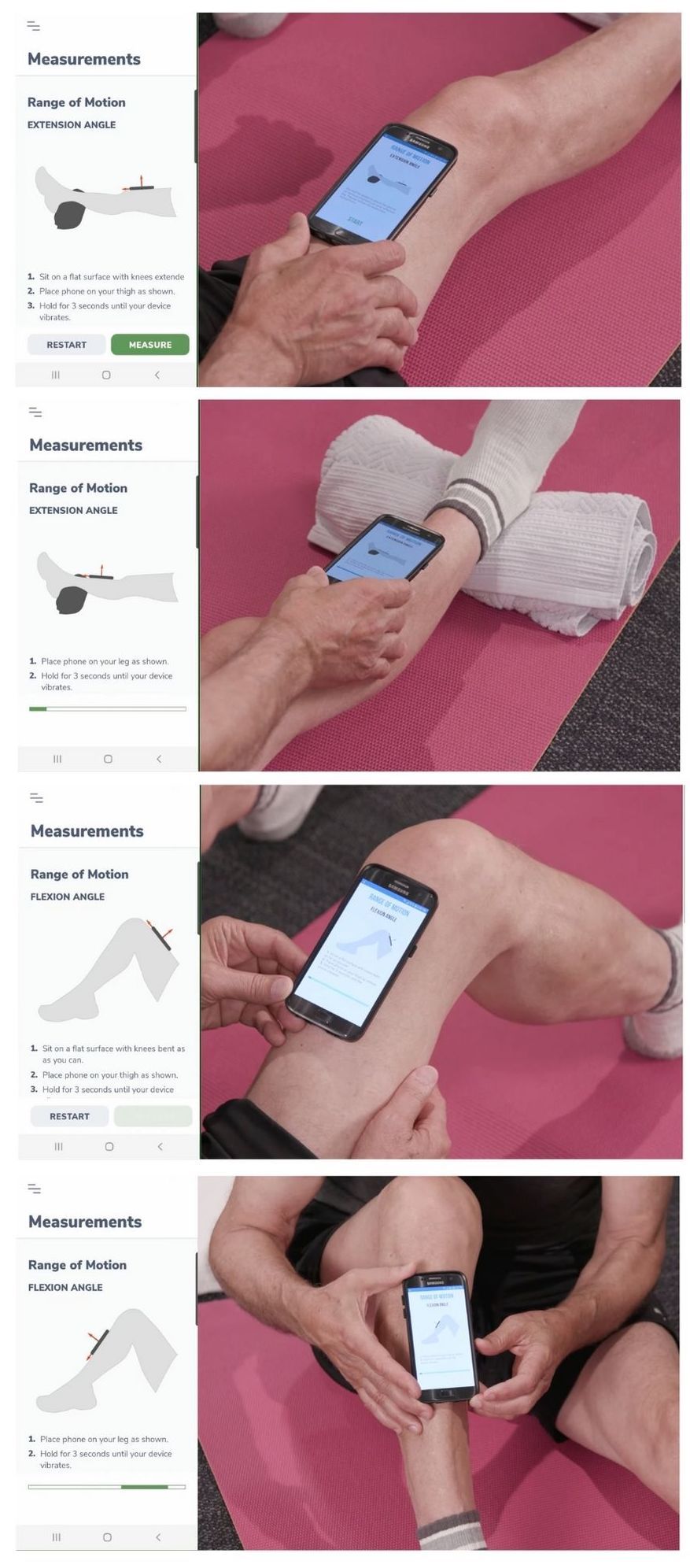
There are 4 simple steps to measure your knee range of motion:
- For knee extension: Place a sturdy towel roll under your ankle and keep your knee straight. Then place your phone above your knee on your thigh with your screen facing up and press start. Hold the phone still until it vibrates. Make sure your phone’s vibration setting is turned on.
- Move the phone under your knee to your upper shin and press measure. Once the phone vibrates, your knee extension measurement is complete. You will receive the results after you have performed your knee flexion measurement below.
- Now bend your knee as far as you can. Place the phone above your knee on your thigh with the screen facing up and press measure. Once the phone vibrates, move the phone to your thigh while your knee is still bent.
- Place the phone on your thigh with the screen facing up. Hold the phone steady until it vibrates. You will now see a knee measurement range for your knee flexion and extension. If you made a mistake, press ‘delete and try again’ or ‘review’. You will be taken to the performance page and you will see all your knee movement measurements. The entire process takes 15 seconds to obtain both a knee flexion and a knee extension measurement.
If you are a visual learner, this simple image below will help you understand exactly how to measure knee range of motion and summarizes the four steps mentioned above.
Ensure accuracy of knee motion measurements
In our peer-reviewed publication, there were a few things we did to ensure we received an accurate reading every time. Here are the main things we did to ensure our measurements were consistent:
- Once you have fully extended or bent your knee, hold this position very still until you have finished measuring
- Do not move the phone until it vibrates as the measurement is not yet completed. Even if your phone does not vibrate, it is likely that notifications and/or vibrations have been disabled for the Curovate app. Once you enable notifications and vibration, the phone should vibrate.
- If possible, hold the phone in place with both hands to keep it steady
- Do not press Measure until you have the phone in the new position and are holding the phone firmly
- Always keep the top of your phone pointed toward your foot and not toward your hip
- Always keep the phone screen facing upwards
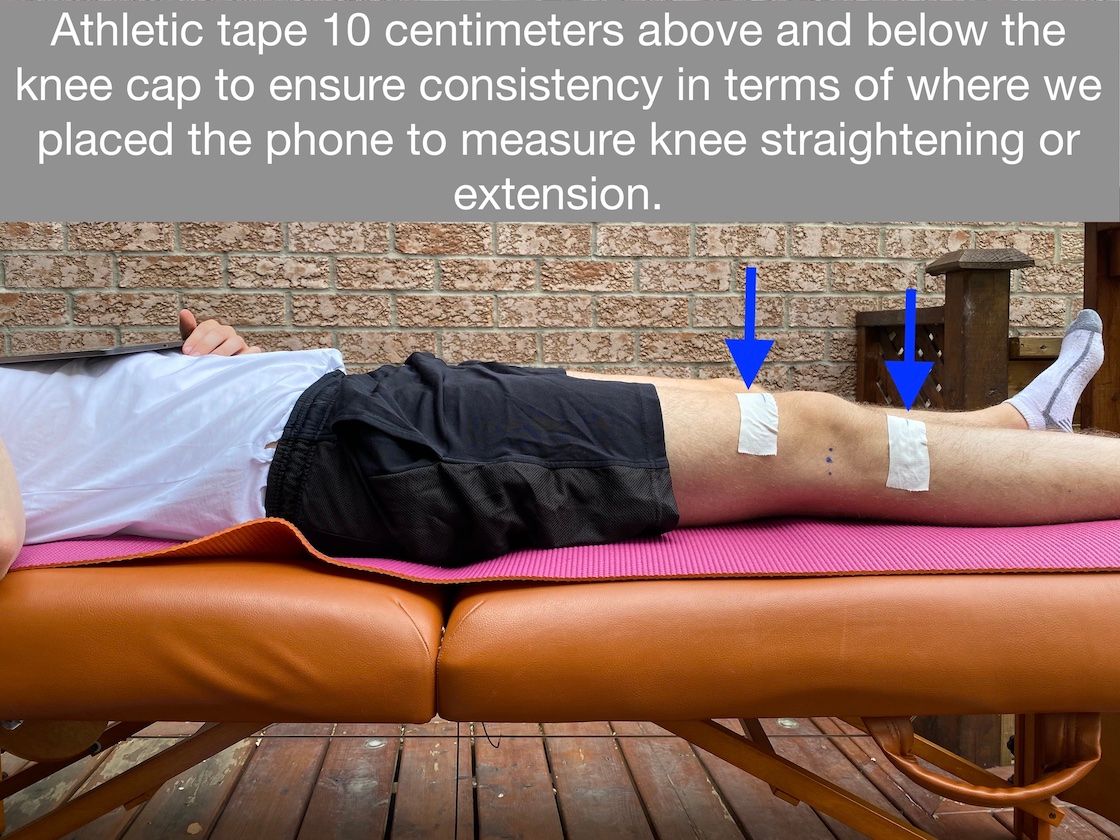
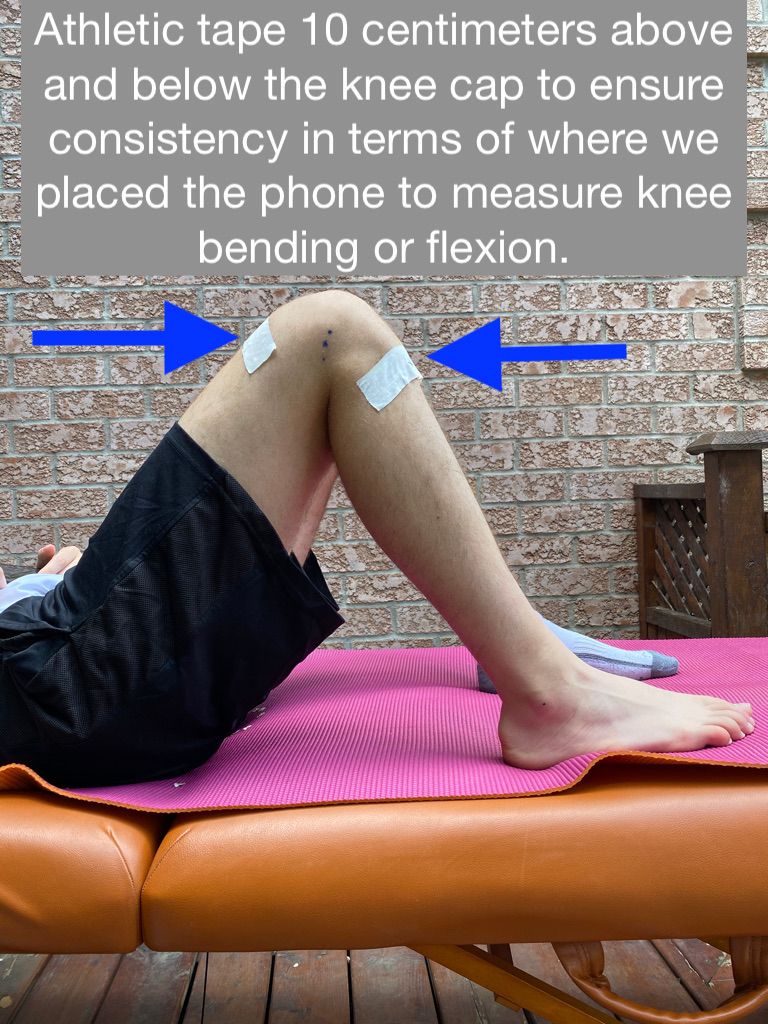
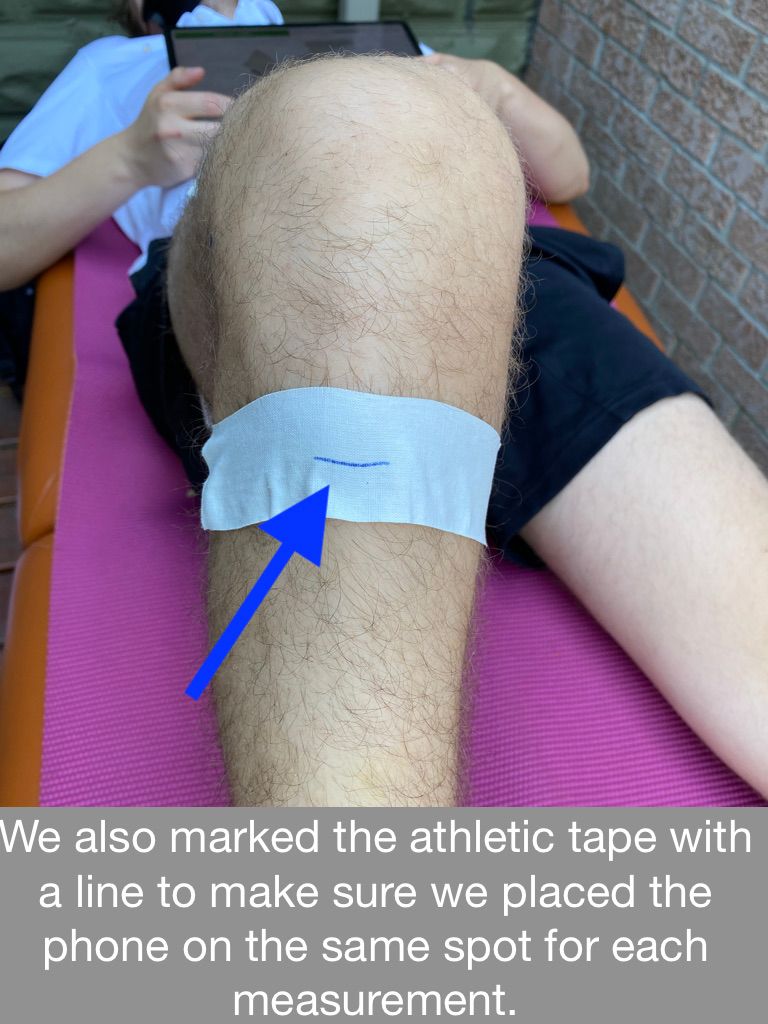
- Mark 4 inches above and below the knee with a marker and/or athletic tape to stay consistent with where you place the phone.
We found that consistently placing the phone 4 inches above and below the knee was critical to obtaining accurate measurements of the knee’s range of motion. This last step may seem a bit excessive for a home measurement of knee range of motion, but we wanted to include it to ensure consistency and the ability to reproduce accurate measurements as we did in our study. A simple at-home method could be: if you know how long 10 centimeters is on your hand, use this as a guide every time you measure with the Curovate app. For example, if the distance from the tip of your index finger to the base of your thumb is 4 inches, use this as your distance from the top or bottom of your kneecap to determine where to place your phone for each measurement.
Check out the images below to see what we did in our research to ensure the consistency of our knee motion measurements. Please note that we took 80 unique measurements as part of this study and found that the seven points mentioned above kept us consistent in our measurements.[1]
Conclusion
Yes, you can accurately measure your knee range of motion at home with the Curovate physiotherapy app. At the end of this blog you will find links to download Curovate. This article summarizes how to take accurate measurements of knee flexion and knee extension. The most important things to remember to ensure accuracy are:
- Measure the same way every time
- Place the phone in the same place above and below your knee
- Make sure the screen is facing up
- Make sure the top of the phone is facing your foot or ankle
- Only press measure in the app when the phone is held still
- Use both hands to hold the phone steady while measuring
- If you want to be really accurate, always place the phone 4 inches above your kneecap if you place the phone on your thigh and 4 inches below your kneecap if you place the phone on your shin to measure your knee flexion and extension
If you would like to read our full research article on how the Curovate app measurement compares to a physiotherapist measuring range of motion, you can find it via this link to the International Journal of Sport Physical Therapy.
Download Curovate to accurately measure your range of motion for knee flexion and extension at home! Our app also provides daily video-guided exercises for recovery after a knee replacement, ACL injury or ACL surgery, hip replacement or for anyone interested in strengthening their knee or hip with safe and effective physical therapy exercises.
If you need more tailored help during your surgery or recovery from your injury, check out our Virtual Physiotherapy page to book your 1-on-1 video session with a physiotherapist.
 |
 |
|---|
References
Leave a Reply to Diagnosing a Traumatic Knee Injury – Knee Hurt Cancel reply